
Odoo has grown into one of the most widely used ERP systems of recent years. More and more companies choose it for its flexibility, its modular set-up and the relatively low barrier to entry. From CRM and accounting through to stock management and e-commerce: Odoo brings everything together in one platform.
Recent market trends show Odoo gaining ground above all with SMEs and growing companies looking for a scalable, affordable ERP solution. Strong local partner networks and the continuous development of the platform feed a growing market share across Europe.
One challenge keeps coming back in practice, though: connecting Odoo efficiently to other systems, such as DTP and publishing tools. Many companies still rely on cumbersome exports to Excel or CSV, which is error-prone and time-consuming.
Why connect Odoo to your catalogue workflow?
For many companies the crucial product information already sits in Odoo: EAN codes, product images, warranty periods, prices and base data. That same data is what you need to build price lists, catalogues and technical data sheets.
Without a direct connection, that usually means:
- Manual exports out of Odoo
- Extra work in Excel
- Importing into InDesign or EasyCatalog over and over
That process does not just cost time, it also raises the risk of errors and inconsistent data.
By connecting Odoo directly to your publishing tool, you can:
- Generate a catalogue automatically from live Odoo data
- Keep price lists up to date quickly
- Build technical data sheets with consistent product information
- Generate a digital catalogue without any manual steps in between
This is particularly interesting for companies with large product ranges or frequent updates.
A direct connection with EasyCatalog (InDesign)
To solve this, I built a direct Odoo–InDesign connection through EasyCatalog. The connector uses the Odoo JSON-RPC API and pulls the data in automatically, with nothing in between.
In practice that means:
- No more manual exports to Excel or CSV
- Product data always up to date, straight from Odoo
- Faster and more reliable workflows for catalogue production
The connector is built as a reusable EasyCatalog Custom Data Provider and is easy to adapt per customer or project.
How does the Odoo JSON-RPC connector work?
The connector uses the execute_kw and search_read methods of the Odoo API to read data from any model. Large datasets are paged automatically until every record has come across.
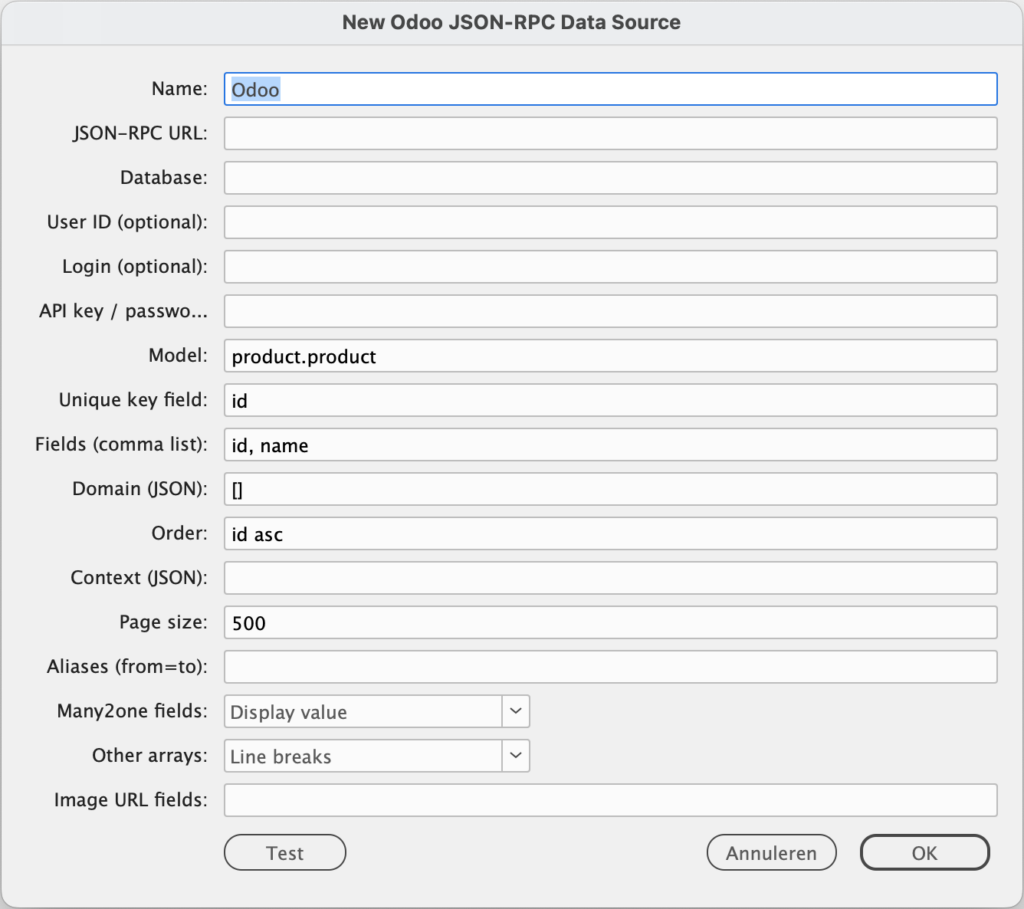
Some of the things it does:
- Works with every Odoo model (such as
product.product) - Pages automatically, so a full export really is complete
- Flexible configuration of fields, filters (domains) and ordering
- Resolves many2one relations to readable labels
- Handles images and lists correctly
A practical example is a product catalogue where EAN codes, images, warranty information and other product data are pulled straight out of Odoo and laid out in InDesign.
The connector is open source on GitHub
The connector is on GitHub. You will find the Lua file there, along with a readme explaining how to install it, how to create an API key in Odoo and which permissions your integration user needs.
One thing to check up front: on Odoo Online the external API is only available on the Custom plan, not on One App Free or Standard. That is covered in the documentation on GitHub, together with the rest of what you need to get going.
Working without the detours
This approach removes the familiar sticking points:
- No more version confusion between different exports
- Less room for human error
- Shorter turnaround for catalogues and technical data sheets
Companies working with extensive price lists, or publishing new catalogues regularly, gain from this straight away.
Adaptable to any customer
The connector is fully reusable and easy to adjust:
- A different Odoo database or environment
- Specific models and fields
- Tailored filters through Odoo domains
- Language settings through context
That makes it suitable for a wide range of sectors and applications.
Built with the next versions in mind
The current version is built on the Odoo JSON-RPC API, up to and including Odoo 18. With later releases in mind, such as Odoo 19 and beyond, the move to the new JSON-2 API is already being taken into account.
Interested in an Odoo–InDesign connection?
Do you work with Odoo and want to produce price lists, catalogues or technical data sheets more efficiently? Then a direct connection with EasyCatalog is the logical next step.
I help companies set up automated catalogue flows based on Odoo, so you can generate a digital catalogue faster, more consistently and without the manual work.